Small tools that live in your notch.
Perch turns the dead space around your MacBook’s notch into a ledge. A small bird waits there, out of sight, until something happens — a build finishes, a break is due, a monitor comes back. Then the ledge grows out of the notch to tell you, and tucks itself away again.
Pay once · macOS 14+ · Apple silicon & Intel · No notch? It hangs from the menu bar · Already bought? Download Perch
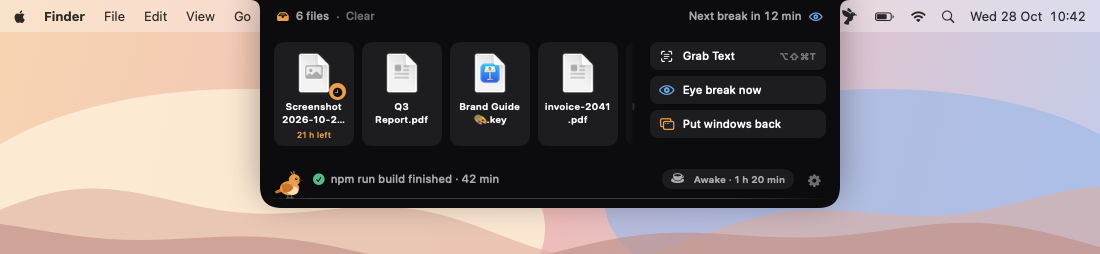
A working model, not a video — sample data. Everything inside the frame is pretend: the page can’t see your files, windows, screen or terminal. The heads-up before a break is shortened to 5 seconds here; the break itself is the real 20.
- Pay once, no subscription
- No account
- Your files and screen stay on your Mac
- Works with or without a notch
- Native on Apple silicon & Intel
- 14-day refund
Quiet until something happens.
Every tool can be switched off, so keep only the ones you want. Dark Mode, Reduce Motion and VoiceOver are respected throughout.
Shelf
Drag files up to the notch to park them, and drag them out later into any app. Nothing is copied or moved: the shelf points at files where they are.
Screenshots land on the shelf
New screenshots wait there for a day (or keep one), then quietly leave. The file itself stays on disk.
20-20-20 eye breaks
Every 20 minutes, a heads-up from the ledge, then 20 seconds of looking at something 20 feet away. Esc skips.
Breaks that know when to wait
Paused during calls, screen sharing, presentations and full-screen video, and held until you stop typing, so a break never lands mid-sentence.
Homing
Unplug a monitor and plug it back in: every window goes back to the display and place it came from, with Undo.
Grab Text (⌥⇧⌘T)
Drag over text you can’t select — a video, a screen share, an error dialog — and it’s on your clipboard. It’s read on your Mac.
Finished pings
“npm run build finished · 42 min” when a long command ends in Terminal, iTerm or Warp. You choose how long counts as long.
With or without a notch
On a display without one, the ledge is a slim pill at the top centre of the menu bar, with the bird asleep inside.
Each tool can be switched off
Keep only the tools you want. Opening on hover can be turned off too: then the ledge opens from the menu bar or with ⌥⌘L.
Comparing notch apps? Read the guide: the best notch apps for Mac
It speaks up, then gets out of the way.
A banner grows out of the notch for a few seconds and shrinks back. Hover it and it waits for you. Nothing piles up in Notification Centre.
Breaks always take the ledge first; anything else waits its turn. If a call starts, the break steps aside until it ends.


A warm bird on a dark ledge.
Screenshots straight from Perch, with sample data. Flip between light and dark.


What stays. What connects.
A notch app sees a lot. Perch keeps all of it on your Mac.
Stays on your Mac
Everything Perch notices, and everything it keeps.
- ✓Your shelfPointers to files where they are. Nothing is copied, moved or deleted
- ✓Grabbed textOnly the area you select, read on your Mac with Apple’s Vision
- ✓Calls and commandsOnly whether the mic or camera is in use, and which terminal commands are running. Nothing is recorded
- ✓Break counts and window layoutsKept in Perch’s own folder. No analytics or tracking
Connects
Two small requests, over HTTPS.
- 1License check, about once a weekYour key and an activation ID, to Dodo Payments
- 2Update checkApp name and version, to
perch.newmac.app
The full list, for every app, is in the privacy policy.
Pay once. Keep it.
One payment, no subscription. Choose how many Macs you’ll use Perch on.
3 Macs
For your home and work Macs
Checkout opens soon. The buttons above go live here the moment it does.
Every plan includes
- One payment, no subscriptionEvery tool, yours to keep.
- License key by emailSent the moment you pay. Activate in one click.
- Move between MacsUse “Deactivate this Mac”, then activate on the new one.
- Free updatesNew versions install themselves.
- 14-day refundNot for you? Read the refund policy.
- macOS 14 or laterNative on Apple silicon & Intel.
Already bought? Download Perch · .zip · Install help
Questions, answered.
Do I need a MacBook with a notch?
No. On a display without a notch, Perch hangs from the centre of the menu bar as a slim pill, and opens the same ledge from there. It needs macOS 14 Sonoma or later, on Apple silicon or Intel.
Which permissions does it ask for, and when?
None at launch. Homing needs Accessibility (to move windows) and Grab Text needs Screen Recording (to read the area you select); Perch asks only when you click Allow for that tool. If your screenshots save to the Desktop, macOS may ask once whether Perch can see that folder. The shelf, breaks and finished pings need nothing else.
Does it record my microphone or camera?
No. Breaks only check whether the mic or camera is in use by another app — the same signal as the orange dot — so they can wait until your call ends. Nothing is recorded or stored.
Is anything sent anywhere?
No. Your shelf, break counts, window layouts and grabbed text stay on your Mac. The only network traffic is the license check (about once a week) and the check for updates.
Does the shelf copy or delete my files?
Neither. It points at files where they are. If you move or delete a file elsewhere it simply drops off the shelf; screenshots leaving the shelf stay on disk.
How do finished pings work?
Perch looks at the commands your terminal shells are running, the way ps does. When one that ran longer than your threshold (5 minutes by default) ends, the ledge shows what it was and how long it took. It can’t see exit codes or output, and it ignores interactive programs like vim, ssh and top.
Does it include clipboard history or keep-awake?
No — those are our separate apps, Clipnest and Vigil. If you use them, Perch can show their status as a small chip on the ledge.
macOS says it can’t verify the developer.
Perch is distributed directly from this website. Here’s how to open it the first time.
Is there a free trial?
No. Use the working model at the top of this page to see exactly how Perch behaves. If it turns out not to be for you, you can ask for a refund within 14 days — see the refund policy.
Can I use Perch on more than one Mac?
Yes. The 3-Mac and 5-Mac plans cover several Macs with one license key. Any license can move to a new Mac: choose “Deactivate this Mac” in Perch on the old one, then activate on the new one.

Give your notch something to do.
Five small tools, one quiet bird, bought once.